Widget CSS Classes
View on WordPress.orgScores higher than 5% of indexed plugins
About
Add custom classes and ids plus first, last, even, odd, and numbered classes to your widgets.
What It Does
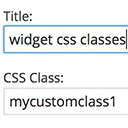
Widget CSS Classes adds extra fields to every widget in the WordPress Customizer so you can assign custom CSS classes and IDs on a per-widget basis. It also auto-generates positional classes like first, last, even, odd, and numbered indexes, letting you target individual widgets or groups of widgets from your stylesheet without touching theme files.
Who It's For
This plugin is a good fit for developers, designers, and agencies who build custom sites and need granular control over widget styling across multiple sidebars or widget areas. It is especially useful for projects where the default WordPress widget markup is too generic to style efficiently with CSS alone.
Who Should Skip It
If you use a block-based theme, rely on full site editing, or only need to style a handful of widgets, you can usually achieve the same results with custom CSS classes added through your theme or a general CSS plugin. Casual bloggers and non-technical site owners will get little value from this tool.
The Bottom Line
Widget CSS Classes does one thing well and is loved by the small audience that has rated it, making it a solid pick for classic widget-area sites that need per-widget CSS targeting. However, the 57.11 overall quality score is dragged down by a complete lack of visible support history and modest adoption, so anyone running a block theme or wanting ongoing developer support should look at broader tools like WPCode instead.
Related Plugins
Pick WPCode when you need to inject custom CSS, PHP, or snippets site-wide, including targeted widget styles, with a much larger install base and broader feature set.
Choose Code Snippets if your widget styling depends on custom PHP logic rather than just CSS classes, since it lets you run conditional code without editing functions.php.
Go with SiteOrigin Widgets Bundle if you want to replace the default widgets entirely with more powerful, styleable widgets instead of adding classes to the existing ones.
One Click Demo Import is unrelated to widget styling and only makes sense if your real goal is importing demo content for a theme or starter site.
Blocksy Companion is the better choice if you already use the Blocksy theme and want built-in widget styling and layout controls without a separate plugin.