Modern Footnotes
View on WordPress.orgScores higher than 71% of indexed plugins
About
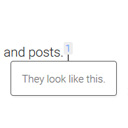
Add inline footnotes to your posts. On desktop, the footnotes will appear as tooltips. On mobile, the footnote will expand beneath the text.
Security History
What It Does
Modern Footnotes lets you attach inline footnote markers to text in your WordPress posts, displaying the references as hover tooltips on desktop and as expandable sections beneath the text on mobile. The dual-mode design means readers on touch devices do not lose access to your citations, which is a common pain point with older footnote plugins. It requires no external service and integrates with the standard WordPress block editor.
Who It's For
This plugin is a strong fit for academic bloggers, journalists, policy writers, and book authors who need to cite sources inline without breaking the reading flow. Its 4.6 minimum WordPress requirement means it works on older sites, and the tooltip-on-desktop, expand-on-mobile behaviour is well suited to research-heavy or long-form publications. The tagged use cases, including legal, medical, and educational content, all line up with this tool's strengths.
Who Should Skip It
If you publish short marketing copy, product pages, or casual blog posts that rarely need citations, the extra markup and reading-flow changes will be more friction than value. Sites needing exportable, numbered endnotes or bibliography management should look at a dedicated reference tool instead.
The Bottom Line
Modern Footnotes earns a 96 user rating on the strength of its clean desktop-tooltip and mobile-expand design, and the overall quality score of 65.47 is held back mainly by poor public support visibility. It is a solid pick for citation-heavy writers who want inline footnotes that work well across devices. If responsive support matters to you, weigh that against the alternatives before committing.
Related Plugins
Pick this when you want a higher overall quality score of 76.08 and a more feature-rich footnotes workflow, especially if you need shortcode flexibility and customizable appearance.
Pick this when you want the largest install count among the three at 8,000 active sites and a simpler implementation, though its overall quality score of 66.84 is only marginally higher than Modern Footnotes.