MathML Block
View on WordPress.orgScores higher than 4% of indexed plugins
About
A MathML block for the WordPress block editor (Gutenberg).
What It Does
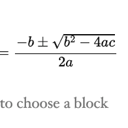
MathML Block adds a dedicated Gutenberg block that lets you write and display MathML equations directly inside the WordPress block editor. Instead of relying on third-party equation editors or image-based formulas, you can paste or author MathML markup and have it render natively for readers. It is a focused, single-purpose tool aimed at users who need accessible, standards-based math on their site.
Who It's For
This plugin is a fit for educators, researchers, scientists, and technical bloggers who publish mathematical or scientific content and want a native block for equations rather than a heavyweight page builder. It works well for academic blogs, STEM course sites, and documentation pages where MathML rendering and accessibility matter more than visual design flourishes.
Who Should Skip It
If you only need the occasional equation or you prefer LaTeX-style rendering with richer visual output, this plugin is probably overkill, and you would be better served by a general block suite like Spectra or Kadence that includes math alongside dozens of other blocks. Casual bloggers and non-technical site owners who do not publish math content will get no value from installing it.
The Bottom Line
MathML Block is a narrow, reasonably maintained plugin that does one thing: render MathML inside Gutenberg, and it scores 54.9 out of 100 on PluginCheck. Its 1,000 installs and lack of any support activity mean you are betting on a small project, but the recent update and current WordPress compatibility reduce that risk. Use it if MathML is central to your publishing workflow; otherwise, a broader block suite is the safer choice.
Related Plugins
Pick Spectra if you want a math-capable block alongside a full library of design blocks for a content-heavy site that needs more than just equations.
Choose Shortcodes Ultimate if you prefer shortcode-based content elements and want a mature, widely deployed alternative with hundreds of thousands of installs.
Go with Kadence Blocks when you need a polished page-building toolkit that includes math support plus strong layout, typography, and responsive controls.
Pick Starter Templates when your priority is launching a full site quickly with pre-built designs rather than adding a single math block.
Classic Widgets is not a math tool at all, so only consider it if your underlying problem is widget management and you are browsing the wrong category.