Input Mask For Elementor Form Fields
View on WordPress.orgScores higher than 81% of indexed plugins
About
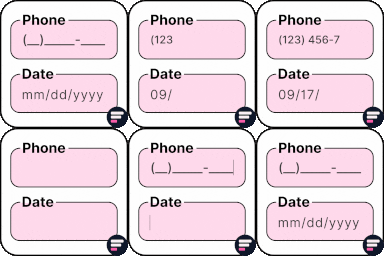
Apply input masks in Elementor form widget fields - phone, date, time, credit card, CPF, CNPJ, CEP & more for valid and error-free entries.
What It Does
Input Mask For Elementor Form Fields adds configurable input masks directly to Elementor's native form widget, enforcing patterns like phone numbers, dates, credit card numbers, CPF, CNPJ, and CEP as users type. It works without shortcodes or a separate form builder, and validation happens client-side so bad entries are caught before submission.
Who It's For
This is best for small business owners, agencies, and freelancers running Elementor-built sites who need quick field formatting for Brazilian (CPF, CNPJ, CEP) or North American data without installing a heavier form plugin. It suits sites collecting standardized inputs where a consistent format matters more than complex conditional logic.
Who Should Skip It
If you already use a dedicated form plugin like WPForms or Gravity Forms with built-in masking and validation, or if your forms rely on heavy conditional logic, multi-step flows, or third-party CRM integrations, you will get more value from those tools than from a masking add-on for Elementor forms.
The Bottom Line
For Brazilian and North American sites running Elementor forms that need reliable input formatting with minimal configuration, this plugin is a focused, well-maintained solution at 80.26/100. It is not a full form builder replacement, and the low support volume means you should verify masking behaviour against your specific Elementor version before relying on it for high-traffic lead capture.
Related Plugins
Pick this if you want input masks bundled with a much larger toolkit of widgets, templates, and Elementor enhancements, and do not mind the added plugin weight.
Choose this when you need input masks alongside header, footer, and page-building extras from a well-known commercial team with a 2 million install track record.
Go with Elementor Pro itself if you want form masks integrated into the core builder experience and are willing to pay for the subscription.
Pick Royal Addons if masked inputs are just one requirement among many widgets and templates you need for a single-site project.
Choose this only if you are primarily after starter templates and AI-built sites, since masking is a peripheral feature here rather than the focus.