Interactive Image Map Builder
View on WordPress.orgScores higher than 46% of indexed plugins
About
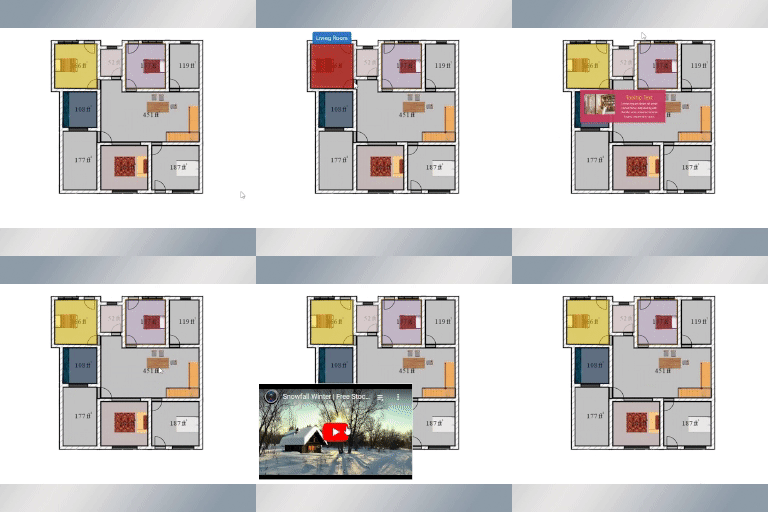
Clickable hotspots can be easily created with this plugin. A great way to display image maps, floor plans, and more.
Security History
What It Does
The Interactive Image Map Builder lets WordPress users place clickable hotspots on any uploaded image, turning static visuals into interactive maps, floor plans, product diagrams, or labeled photos. Editors can define hotspot regions directly within the media library and link each one to URLs, pages, or custom content. The output renders as front-end overlays that visitors can interact with on any device.
Who It's For
This plugin fits small businesses and niche site owners who need to embed a single interactive image, such as a real estate floor plan, a warehouse layout, a museum exhibit guide, or a labelled team photo, without paying for a SaaS tool. It is well suited to sites with one or two maps rather than enterprise-scale image workflows. Non-technical editors will appreciate that hotspot creation happens inside the familiar WordPress media interface.
Who Should Skip It
Anyone needing bulk image management, analytics on hotspot clicks, conditional hotspot logic, or e-commerce product tagging should look elsewhere, as this plugin is scoped to a single image at a time. Developers building a custom interactive solution will likely find the feature set too thin to extend.
The Bottom Line
Interactive Image Map Builder is a focused, well-maintained tool that delivers exactly what its name promises for simple, single-image hotspot projects. Its 75.93 overall quality score reflects solid ratings and currency tempered by a tiny install base and no public support history. Recommended for straightforward image map needs, but pass if you require scale, analytics, or deeper interactivity.