Hide WP Toolbar
View on WordPress.orgScores higher than 6% of indexed plugins
About
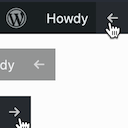
Easily hide or show the front-end WordPress Admin Toolbar with a click of a button.
Security History
What It Does
Hide WP Toolbar adds a button that lets logged-in users instantly hide or show the front-end WordPress admin bar without modifying their profile settings or touching code. It is a lightweight toggle that affects only the toolbar's display on the public-facing side of the site for the viewing user. The plugin does not remove toolbar access in wp-admin, and it does not provide role-based or per-page hiding rules.
Who It's For
This plugin is a good fit for site owners and developers who hand WordPress logins to non-technical clients, guest contributors, or members who find the front-end admin bar distracting or visually cluttering on polished pages. It also suits small portfolios and freelance sites where a cleaner public view matters more than back-end customization. Anyone wanting a quick way to suppress the bar without diving into user profile screens will appreciate it.
Who Should Skip It
If you need to hide the toolbar only for specific roles, pages, or device types, this plugin is too narrow and you should look at a visibility or membership rules plugin instead. You also do not need it if you are comfortable editing functions.php with a one-line show_admin_bar filter.
The Bottom Line
Hide WP Toolbar does one small thing and appears to do it well, earning strong ratings from a small pool of users and a recent compatibility update. The main caveats are its tiny install base, the absence of any PHP version declaration, and a feature scope that is narrower than many site owners actually need. It is worth installing only if a simple per-user toggle matches your exact requirement; otherwise, a more flexible visibility plugin will save you a second add-on later.
Related Plugins
Pick this instead if your real goal while debugging is to see which template file is loading, not to hide the toolbar.
Choose this if you need to obfuscate contact details from scrapers, which is a very different security task from tidying the front-end bar.
Pick this when you want quick insight into the template hierarchy while developing themes, rather than a simple toolbar toggle.
Choose this when you need granular, condition-based visibility rules inside Elementor, including per-role or per-page toolbar and content control.
Pick this if your priority is hardening WordPress by rewriting front-end paths and URLs, not just hiding the admin bar.