Form Input Masks For Elementor Forms
View on WordPress.orgScores higher than 62% of indexed plugins
About
Add input masks to Elementor Pro or Hello Plus form fields - phone, date, time, credit card, CPF, CNPJ, CEP & more for accurate entries.
What It Does
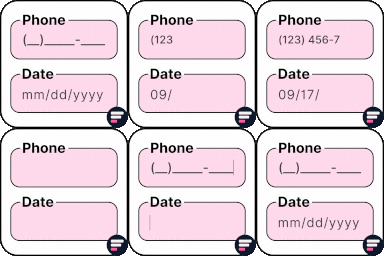
Form Input Masks For Elementor Forms adds formatted input masks to fields inside Elementor Pro and Hello Plus forms, including patterns for phone numbers, dates, times, credit cards, and Brazilian formats like CPF, CNPJ, and CEP. The masks guide users to type data in the correct shape (for example, automatically inserting parentheses around area codes or dashes in a CNPJ), which reduces typos and improves the quality of submitted data.
Who It's For
This plugin is a good fit for small to mid-sized sites built on Elementor Pro or Hello Plus that need cleaner, more consistent form entries without writing custom JavaScript, particularly sites serving Brazilian audiences given the CPF, CNPJ, and CEP masks. It also suits agencies or freelancers who want a lightweight, single-purpose add-on instead of a full Elementor extension suite.
Who Should Skip It
If you already use a major Elementor addon bundle like Essential Addons or Ultimate Addons, you likely do not need a dedicated masks plugin since most of those suites include equivalent input mask widgets. Sites not using Elementor Pro or Hello Plus for their forms will also get no value from this plugin.
The Bottom Line
With an overall quality score of 77.71 out of 100, this is a focused, well-maintained utility that does one job competently, particularly for Brazilian-formatted data. The lack of public support threads is a real concern, but the recent update activity and clean compatibility profile make it a reasonable pick for Elementor Pro or Hello Plus users who need masks without bloat. If you already run a major Elementor addon suite, skip it to avoid redundancy.
Related Plugins
Pick this if you want input masks bundled with 80-plus other Elementor widgets and templates rather than a standalone masks plugin.
Choose this when you need input masks as part of a broader Elementor extension kit that also covers headers, footers, and advanced widgets.
Go with Elementor Pro itself if you are not already subscribed, since core input mask functionality ships with the Pro form widget for many common patterns.
Pick this if you want a newer addon suite that includes input masks alongside many other creative widgets at a comparable footprint.
Choose this when your priority is quickly launching a complete Elementor site with starter templates rather than enhancing form behavior.