Collapsing Categories
View on WordPress.orgScores higher than 33% of indexed plugins
About
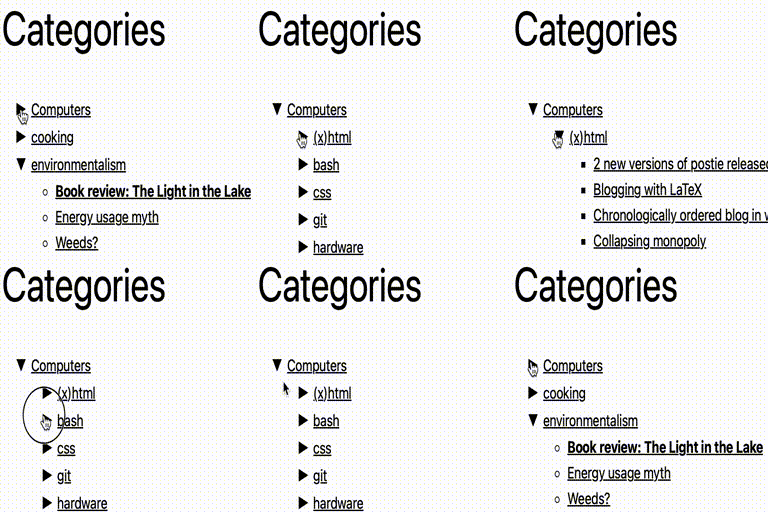
Adds a widget which uses Javascript to dynamically expand or collapse the set of posts for each category.
Security History
What It Does
Collapsing Categories adds a WordPress sidebar widget that displays your category list in a collapsible, expandable tree. Visitors click a category to reveal its subcategories and posts, or click again to collapse the view, with the expansion handled by JavaScript rather than a full page reload. It keeps long category lists compact and easier to scan on sites with deep taxonomies.
Who It's For
This plugin is best suited for content-heavy WordPress sites such as blogs, news portals, magazines, documentation archives, or resource libraries that have many categories and subcategories to navigate. It is a good fit for site owners who want a space-saving sidebar widget that lets readers drill into specific topic areas without overwhelming the page layout.
Who Should Skip It
If your site only has a handful of categories, or you already use a full-featured menu plugin that supports taxonomy-based navigation, this widget adds little value and can be skipped. Sites that prefer flat archives, tag-based browsing, or a mega menu interface will not benefit from a simple collapsing tree.
The Bottom Line
Collapsing Categories is a focused, lightweight widget that does one thing well: turning long category lists into a tidy, click-to-expand sidebar tree. It earns a 75.93 overall quality score, with strong maintenance and compatibility offsetting modest popularity and a thin support footprint. If your site is drowning in categories and you want a no-fuss collapsible widget, it is worth a try, but most users will want to verify it works with their current theme before committing.
Related Plugins
Pick this instead if your priority is embedding Google Reviews in a sidebar rather than navigating local categories.
Choose this alternative when you want a polished, visually rich Google Reviews widget over taxonomy navigation.
Choose this when you want to surface trending posts by views or comments instead of organising content by category hierarchy.
Pick this if your readers need trail-based navigation context rather than a collapsible category tree in the sidebar.
Choose this when you need rich, multi-column navigation menus that go far beyond a simple collapsing category list.